Support This Blog. Click Here

Buy Something ?

Pages

MKV movie in small size

This blog will provide small size link for Blue Ray Rip movie. It is alternative site for those movie lovers...

PROMOTION

Get paid To Promote at any Location

Advertisement

Showing posts with label tutorial. Show all posts

Wednesday, December 15, 2010

HOW TO DOWNLOAD MOVIE SUBTITLE


First step is to find out the sites that provided movie subtitle. Below are the list of subtitle site and it contain category :-
  1. www.mysubtitles.com – very nice
  2. www.opensubtitles.org – dependable, peer-reviewed
  3. www.subscene.com - Friendly use.
  4. www.divxsubtitles.net – very comprehensive, loads of movies
  5. www.titulky.com
  6. www.subdb.net
  7. subtitles.shadowork.net
  8. www.subtitles.wz.cz
  9. www.subtitlesbox.com
  10. subtitles.images.o2.cz
  11. www.divxsubtitles.net
  12. www.divxmovies.com/subtitles
  13. subtitrari.softpedia.com
  14. www.napisy.org
  15. www.divxplanet.com
I like to get subtitle from subscene.com because it easy and friendly use. We just key in the movie title in the search box and the result shows all the subtitle according to the language sequence.
Normally a lot of subtitle come out from the searching result, so we need to choose which is suitable to our movie. Movie source is important to match with selected subtitle. 
Fail to match may cause movie audio and subtitle will not match. To understand type of movie, you may refer to my earlier tutorial:-
http://mkv-shortmovie.blogspot.com/2010/12/category-of-movie-rip-file.html

Example search for The Sixth Sense and result come out as per below:-
If your movie is DVDrip format choose as selected area and start download. 
Important : Choose Subtitle according to your movie source file. If you download movie from this blog, which  is BRrip format, Choose 720P.BlueRayX264-HDEX - 3 rows above than DVDrip subtitle.


After completed download the subtitle, change subtitle name according to your movie name. Example: Movie name : The Sixth Sence.mkv , the subtitle shall be: The Sixth Sense.srt
Place both movie and subtitle file in same folder and play the movie. The subtitle will automatically detect  if you play with VLC media player.

Tuesday, December 14, 2010

HOW TO RIP BLUE RAY MOVIE TO MKV FILE

Theoretically the movie ripping process from Blue Ray disc to MKV file demonstrate as per above diagram. Audio, video and subtitle are encoded separately. 
To Rip your BD movie, a few software avalilable and one of them is Aiseesoft. The software can download free from internet:-
From the Audio and video option you may choose what type of output you want. Video better choose H.264 compare to other Meg-4, Theora. H.264 is a standard for video compression. 

There are several type of audio quality you may choose. As I explained in the earlier tutorial DTS will consume a lot of space.
http://mkv-shortmovie.blogspot.com/2010/11/how-to-choose-best-movie-quality.html
AAC - 2 channel is reasonable unless you plan to play with your Home theater audio system 5.1 channel or bigger.

Subtitle you can hard corded together in the MKV file or place it separately.I prefer keep it separately because easier for you to edit if necessary.

Movie subtitle can get easily from movie subtitle website. Example: Subsene. It free without register to login...Link as below:-
http://subscene.com/search.aspx

By choosing the option as I mention in this tutorial, you may save your lovely movie with small size without lost of quality.

Tuesday, December 7, 2010

WHY CHOOSE MKV FOR MOVIE

One question always ask by user is why choose MATROSKA (MKV) format to rip the movie. Why don't use MP4, AVI, MPEG or others. To answer the question, we need to understand of MKV's advantage first.

1) MKV are streamable, .iso & video_ts are not.
Streamable means the myihome, llink, and others can stream them to the PCH without requiring you to manually configure network shares.

2) MKV can have multiple audio tracks, multiple subtitle tracks and it can have chapters

3) You can convert from .iso/video_ts to .mkv pretty quickly using mkvmerge gui - no transcoding required.

4) If you want to rip movie. MKV will be reduce in size, let's say you convert a 4.5gb .iso to .mkv, will i see a significant size reduction. Example : If i take my 4.5gb media and .mkv can be around 800MB, that might be a nice option. (of course not losing quality
MKV can contain video in different formats: H264, MP4, etc
MKV can contain several audios in addition to different types: AC3, MP4, MP3, OGG, etc
MKV can contain several subtitles in different formats: SRT, ASS. IDX/SUB, etc.
MKV supports chapters

If you use the codec H264 for the video you be able to reduce the size of the movie to the half without valuable loss of quality, using bitrates between 2500 and 3500.

In simple word, MKV can maintain the quality of your Blue Ray Movie with small size of file.
You can learn why HD movie - Blue Ray important to match with your LCDTV.

That why I choose all the movie file use MKV format. 

Sunday, December 5, 2010

HOW TO MANAGE IN PROGRESS DOWNLOADED FILE

Every time download from internet we are worrying the link will be broken or sometime our PC accidentally shut down. There are several method to ensure our download item can be pause and re-download again. We also can scheduling the download time and it will start automatically.

One of the software provided this service is Free Download Manager (FDM). It can be download free from the internet. Link : http://www.freedownloadmanager.org/

After install the software completely, you may start manage your downloaded item include the MKV Movie. Run your new FDM and you may see below window.
Copy movie download link and click at the add download icon - At the to left side as '+' symbol. The download link will automatically add and click OK button.

Your download item start downloading and you can pause and stop and also schedule the timing. FDM can be set automatic start download every time star up your PC and also can stop your PC automatically when finish download.

By using this FDM, you no need to worry of shut down issue or broken link anymore.

Saturday, December 4, 2010

WHY MOVIE RESOLUTION IS IMPORTANT

To understand why we need high resolution or high definition (HD) movie to play and match with our 40 inch LCD TV, I will define the resolution first. Resolution measure by width X height.

Resolution is the term used to describe the number of dots, or pixels, used to display an image. Higher resolutions mean that more pixels are used to create the image, resulting in a crisper, cleaner image.
The display, or resolution on a monitor, is composed of thousands of pixels or dots. This display is indicated by a number combination, such as 800 x 600. This indicates that there are 800 dots horizontally across the monitor, by 600 lines of dots vertically, equaling 480,000 dots that make up the image you see on the screen.
In simple word, Resolution 1280X1080 is better in quality compare to 1280X720. The highest resolution will produce more dot or pixel and our movie become more sharpen and clear. Earlier tutorial explained why we need HD movie : 
http://mkv-shortmovie.blogspot.com/2010/12/why-need-high-definition-hd-movie.html

Choose the high resolution movie to play perfectly match with your 40 inc LCD TV.

Friday, December 3, 2010

HOW TO PLAY MKV FILE TO LCD TV

Can we watch MKV movie file through LCD TV ?
That is what inside our mind when start playing MKV movie. Normal condition is use PC through  CRT monitor or LCD monitor.

Without CPU, we need a MKV player and direct connect to our LCD TV. MKV Player normally design in small size (5 inch ~ 6 inch length) and it will cost around USD 50 ~ USD 100 or MR150 ~ MR350. It depend on the function and brand.
Above photo is the example of MKV movie player. We need to connect video output with an HDMI cable. Slot in our downloaded movie into the USB slot and play the movie. By using this devise we can play directly our MKV movie and watch through 40' LCD TV.

Thursday, December 2, 2010

TIP: HOW TO JOINT DOWNLOADED FILE

This tutorial is for 1st time user. After Downloaded complete all related file you need to joint back as a movie. Every movie was split into small file mkv.001, mkv.002, and so on.
To joint you should have hjsplit software. Software can get free from internet. Detail already explained in the earlier tutorial. Read tutorial on how to download :  

After completed install the HJ-Split, run the program. The above icon will appeared. Click at the join icon to joint all your file.

Choose what file to joint. Click input file icon.
New window show file location an automatically shows mkv.001 file only. Select the file mkv.001 and click open.
Click star button and your movie now start joining. It will take a few minute.Joining completed message will appeared. Click OK.
Your movie is ready to watch...

Wednesday, December 1, 2010

Category of Movie Rip File


There are a few type of Movie rip file and we need to understand before start downloading:- 
1) CamRip (CAM): The lowest quality. Movies are recorded with the camera screen theater. Some movies seen heads of other moviegoers, etc. The sound quality is different, possible interference such as laughing audience.

2) Telesync (TS): Records the professional (digital) camera mounted on a tripod in an empty theater with a screen. Video quality is much better than a simple camera (Cam). Sound is recorded directly from the projector or with another separate exit, such as a headphone jack in the chair (as in plane). The sound thus obtained is very good and without interference. Typically sound in stereo.
3) Screener [SCR] : The second place on quality. It uses Professional videotape for the press. The picture quality is comparable to a good VHS. Sound too good, usually a stereo or Dolby Surround.
3) DVDScr: A DVD Screener is a promotional copy of a motion picture sent by a movie studios (on a DVD-Video disc) before the official DVD release date to movie critics, censors etc. The term DVDSCR is used by movie pirates to describe the source material of a bootleg SVCD, DivX, XviD or DVDR copy of a DVD Screener. These copies are usually of high, near-retail quality, but often contain some little extras on the video stream.

4) Workprint (WP): The special candy for fans of movies. This so called “beta” movie. This is a preliminary version of the film. Because that we can expect everything. From super quality, to complete sludge. Often missing some scenes. However it may be such that there is every scene, and then they will cut … Read these versions can be a timer at the top or bottom screen – I need it for later editing.
5) VHS-Rip: rip made with VHS-tape. Differs oversaturation colors (typical for VHS). Also in the movie meet the horizontal strip and shake pictures – jammed film defects or loss of tracking. The edges are visible characteristic VHSnye noise – white spots and stripes.
6) Telecine (TC): This version is very rare. But the quality is very good. The source is a projector with outputs for audio and video. Film record directly from the projector. The quality of video and sound great.
7) BDRip: Rip with Blue-Ray disc – usually in high resolution (1080 or 720 lines).

8) BRrip: Rip from BDRip or other file but not from original BD.

The best is BDRip or BRrip if difficult to find BDRip.

WHY NEED (HIGH DEFINITION) HD MOVIE

Lately every body talk about HD, HDTV, HD Movie, HDMI and so on. Are we really understand High Definition (HD) is stand for what. Why we need to play HD movie beside normal DVD.


Lets define HD first. High-definition refers to an increase in display or visual resolution in any media - TV, Video, HD DVD etc...
HD movie is referring the movie with high resolution and most commonly involves display resolutions of 1,280×720 pixels (720p) or 1,920×1,080 pixels (1080i/1080p). The best resolution of movie is from Blue Ray Disc.

When HDTV either LCD TV and plasma TV monopolize the market, HD movie become a compulsory thing to suite with the new technology. To play 40 inch full HD LCD TV required to play HD Movie. If not the picture become a bit blur- not sharp enough. Normal DVD can't perform the optimum resolution.
DVD max only 720X480 (480P) and how to meet 40 inch LCD resolution 1280 X 1080 (1080P). The only way to play sharp and clear movie is to use Blue Ray Disc (BD) or BRRip movie.

You may compare quality of 1080P rip movie in this blog  

Tuesday, November 30, 2010

HOW TO CHOOSE BEST MOVIE QUALITY

Before start download movie from internet, our concern is the quality of the movie. Is it a high quality movie or just a cinema copy. We don't want to waste our time waiting to complete all the file but as a result : we got a junk file. The audio and video quality of the movie is too bad.

To understand what type of movie we want to download, look at the source of the movie. Blue Ray is the best quality compare to others (DVD, TS, CAM, etc. ). Due to High Definition (HD) movie took very large of capacity, Up-loader need to rip the file. Note :Don't choose CAM because it is a cinema copy by view Cam camera.

DVDRip means the source is DVD, BDrip means it came from Blue Ray Disk. BRrip is a file rip from Blue ray but not from the original disk.

First, choose the best source. Then, look at the resolution. Best resolution is 1080P (1280X1080)but it will consume large space while download. So, 720P (1280X720) is reasonable. Rip file resolution 1280X544 or 1280 X 688 is common size.

To have a good sound system, THX is the best but difficult to rip. DTS is the best for rip file but if you are playing the movie using PC, AC3 (2 Channel) is enough. Normally DTS (5 channel) will consume a lot of space (Above 1GB). So, Choose 2 Channel the best option to download (copy) small a size of file.

Now, you already understand how to choose best quality of movie. So far, MKV is the best movie rip file which it consume low space capacity and maintain a high Quality of audio and video.

As summary :-
1) Choose type of source - BRrip
2) Choose resolution - 1280 X 720
3) Choose sound system - AC3 (2 Channel)

Good luck - choosing good movie!

Monday, November 29, 2010

HOW TO SAVE YOUR MOVIE SAFELY

When we start download movie into our hard disk, we will face not enough space to keep. Average Rip movie file is 500 MB. One Hard Disk 300 GB only can keep maximum 600 movie.
That storage for Rip file of normal Quality of movie but if we want to save High Definition (HD) movie, It will take a lot of space.
Average of HD Movie file is 6 ~ 15 GB, that means 300 GB hard disk only can store maximum 50 Movie. One of the risk is the hard disk possible corrupted by virus or damage due to bad handling.

There is the easier way to keep our file safely and dot required to have own hard disk. As I explain in earlier tutorial : http://mkv-shortmovie.blogspot.com/2010/11/how-to-download-movie.html , there are several server provided free uploading file. Rapidshare is one of the side provide upload & download service.
By saving our file in that Website, we don't have to think capacity issue any more. Our file will keep safely and secure by the Website.
Note : there is term and condition by the Website to keep our file storage safely and secure. Refer detail on the Website.

Saturday, November 27, 2010

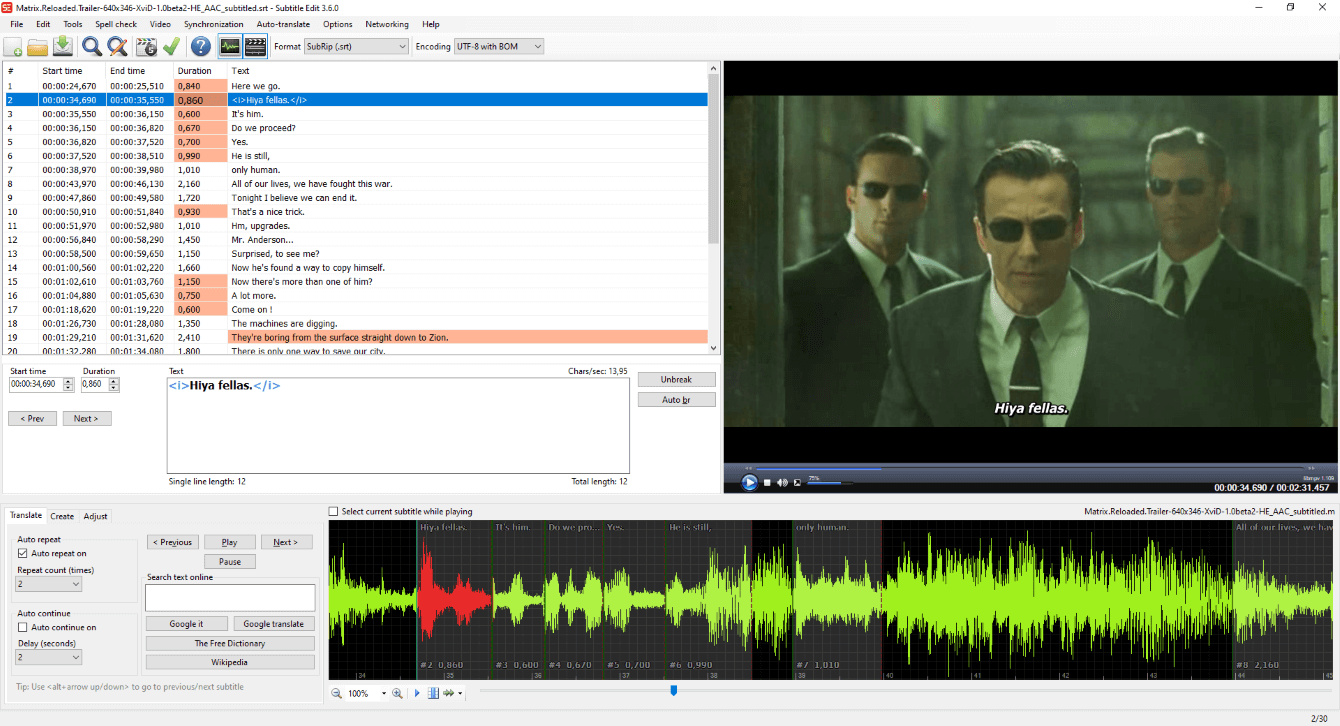
How to translate Movie subtitle

Every time try to download subtitle, we will face problem to match with our language. Some subtitle available and match with our movie but in different language that we need.

What we need to do is translate it to our favorite language. To do it, 1st step is to have subtitle translator. Free software available from the internet.
Subtitle Edit 3.0 is one of the firmware and I feel easy to use. You may download free from below link:-

After Install the software, start translete your subtitle.
1) Click open icon - Choose your subtitle to translete.
2) After the subtitle loading - Click Auto-translate icon which located at the top side.
3) 3 options given - choose which translator you want to use. Example: Choose Translate(Powered by Google).
4) Choose language you want and click translate icon.
5) Google will translate automatically and click OK when completed.
6) Your new subtitle is ready and save as new file name.

Following this step may allowed you to have any language you want.

How to Play movie with Subtitle

Every time play movie through PC or laptop, we will facing subtitle problem. Some movie not provided subtitle in the hardcore. That means downloaded movie only give you an audio and a video but no subtitle.

In that case you need to find subtitle yourself.. There are a few web-side provided free downloading from the internet. Before start to search for the subtitle, you need to understand what type of source of your movie. Most of the movie are came from DVD or BD.

If your downloaded movie type of DVDrip you shall look for DVDrip subtitle. If BDrip look for resolution 480P, 720P or 1080P. After known the movie type only start searching.

Below are the example of subtitle side.

The most popular side is sunsene.com.


Link:: http://subscene.com/


Type your movie title and download accordingly. You may choose what language you like. If you Indonesian just choose Indonesian from the option given. Its done, now you al-ready have your own subtitle.

To play subtitle along the movie, make sure you locate your movie and subtitle in the same folder. If you are using VLC player, the subtitle will load automatically when start play the movie.


HAPPY watching movie with your own subtitle.

Thursday, November 25, 2010

HOW TO PLAY MKV FILE

The most advance movie rip file is MKV. MKV is stand for MATROSKA.
Most of Blue Ray movie rip into MKV file due to this file can maintain high quality movie with a small size (capacity).

To play MKV file required VLC player. Winamp or Win media player not supported this file.
This software can be downloaded free from internet :-
Link : http://vlc-media-player.en.softonic.com/

To play smoothly, you need to check your PC Codec. K-lite codec is the best firmware to run MKV file.
You need to install from internet.

Free download available:
http://www.free-codecs.com/download/k_lite_mega_codec_pack.htm

Now, you may watch your downloaded movie from this blog smoothly...

Happy downloading...

HOW TO DOWNLOAD MOVIE


1) First, You need to register hot file or rapid share.
Link :-
Hot file :
http://hotfile.com/register.html

Rapid share :
http://rapidshare.com/#!rapidtools/rapidtools_rsm

2) Download all files - Example file 1 ~ file 4. Click at the link given : file1, file 2, and so on...
Keep all the file in same folder.

3) Install joint file software. This file are split file and need to be joint.
Download free split/joint software. (hjsplit) and install to your PC.
Link :-
http://hjsplit.en.softonic.com/

4) Joint all the movie file by using hj-split software. How to joint file given detail in the next tutorial :-
http://mkv-shortmovie.blogspot.com/2010/12/tip-how-to-joint-downloaded-file.html
Make sure all the file completed download and in same folder.


HAPPY DOWNLOADING.....

LinkWithin

Related Posts Plugin for WordPress, Blogger...