Support This Blog. Click Here

Buy Something ?

Pages

MKV movie in small size

This blog will provide small size link for Blue Ray Rip movie. It is alternative site for those movie lovers...

PROMOTION

Get paid To Promote at any Location

Advertisement

Showing posts with label Owner. Show all posts

Sunday, December 5, 2010

HOW TO MANAGE IN PROGRESS DOWNLOADED FILE

Every time download from internet we are worrying the link will be broken or sometime our PC accidentally shut down. There are several method to ensure our download item can be pause and re-download again. We also can scheduling the download time and it will start automatically.

One of the software provided this service is Free Download Manager (FDM). It can be download free from the internet. Link : http://www.freedownloadmanager.org/

After install the software completely, you may start manage your downloaded item include the MKV Movie. Run your new FDM and you may see below window.
Copy movie download link and click at the add download icon - At the to left side as '+' symbol. The download link will automatically add and click OK button.

Your download item start downloading and you can pause and stop and also schedule the timing. FDM can be set automatic start download every time star up your PC and also can stop your PC automatically when finish download.

By using this FDM, you no need to worry of shut down issue or broken link anymore.

Saturday, November 27, 2010

How to translate Movie subtitle

Every time try to download subtitle, we will face problem to match with our language. Some subtitle available and match with our movie but in different language that we need.

What we need to do is translate it to our favorite language. To do it, 1st step is to have subtitle translator. Free software available from the internet.
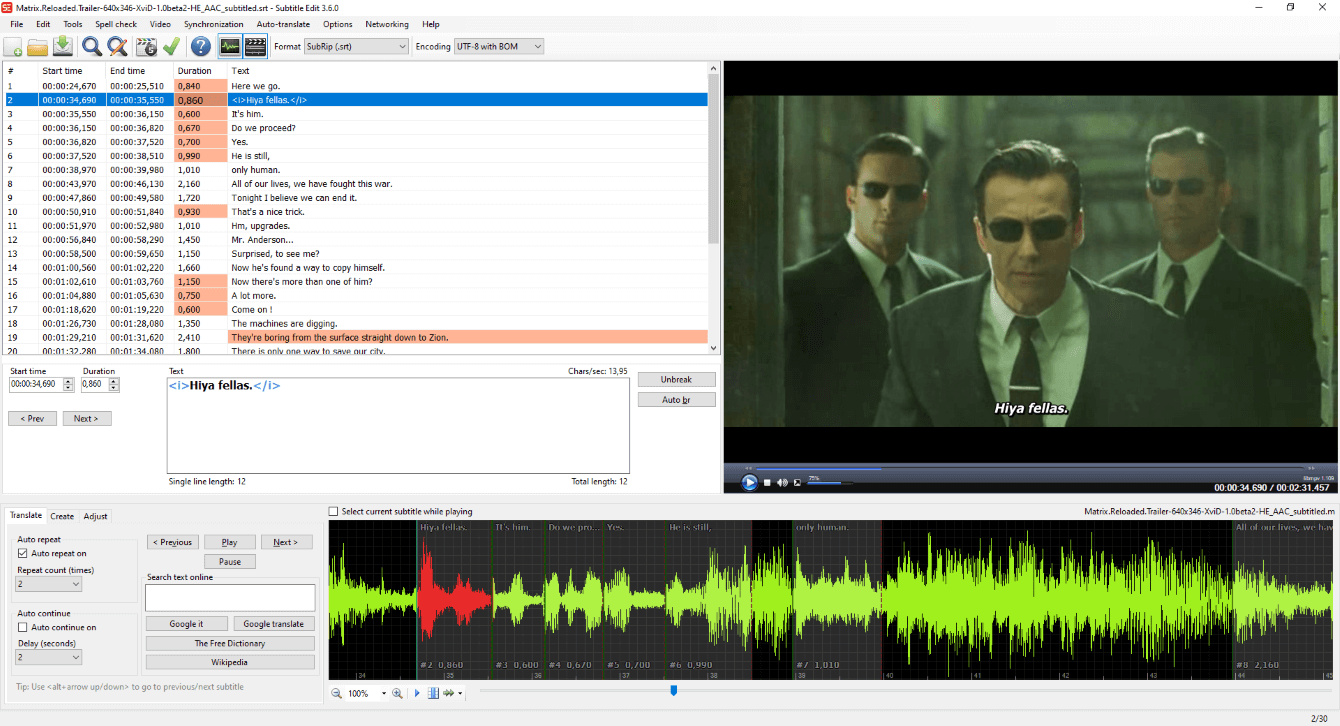
Subtitle Edit 3.0 is one of the firmware and I feel easy to use. You may download free from below link:-

After Install the software, start translete your subtitle.
1) Click open icon - Choose your subtitle to translete.
2) After the subtitle loading - Click Auto-translate icon which located at the top side.
3) 3 options given - choose which translator you want to use. Example: Choose Translate(Powered by Google).
4) Choose language you want and click translate icon.
5) Google will translate automatically and click OK when completed.
6) Your new subtitle is ready and save as new file name.

Following this step may allowed you to have any language you want.

Thursday, November 25, 2010

HOW TO PLAY MKV FILE

The most advance movie rip file is MKV. MKV is stand for MATROSKA.
Most of Blue Ray movie rip into MKV file due to this file can maintain high quality movie with a small size (capacity).

To play MKV file required VLC player. Winamp or Win media player not supported this file.
This software can be downloaded free from internet :-
Link : http://vlc-media-player.en.softonic.com/

To play smoothly, you need to check your PC Codec. K-lite codec is the best firmware to run MKV file.
You need to install from internet.

Free download available:
http://www.free-codecs.com/download/k_lite_mega_codec_pack.htm

Now, you may watch your downloaded movie from this blog smoothly...

Happy downloading...

Wednesday, November 24, 2010

Introduce a new blog

Hi all,
This blog to provide link MKV in small capacity.
Only rip from Blue ray movie.

All below 1 GB file.

Daily will update the movie.

LinkWithin

Related Posts Plugin for WordPress, Blogger...